Inside the actual dashboard: a real Assay account, mid-week. Just kidding, it's a demo.
Most product demos are staged. This one is too, and we say so. It is our demo account, and every number on it is made up: 563 calls, 150 hot leads, 100 booked meetings.
Every product demo you have watched was built to be watched. Someone picked the account, cleared the queue, and scripted the click path. This one is the same, and the title above is the joke. It is a demo account, set up as a Professional-tier outbound campaign on day 12 of a 30-day cycle. The numbers are made up.
What is on screen
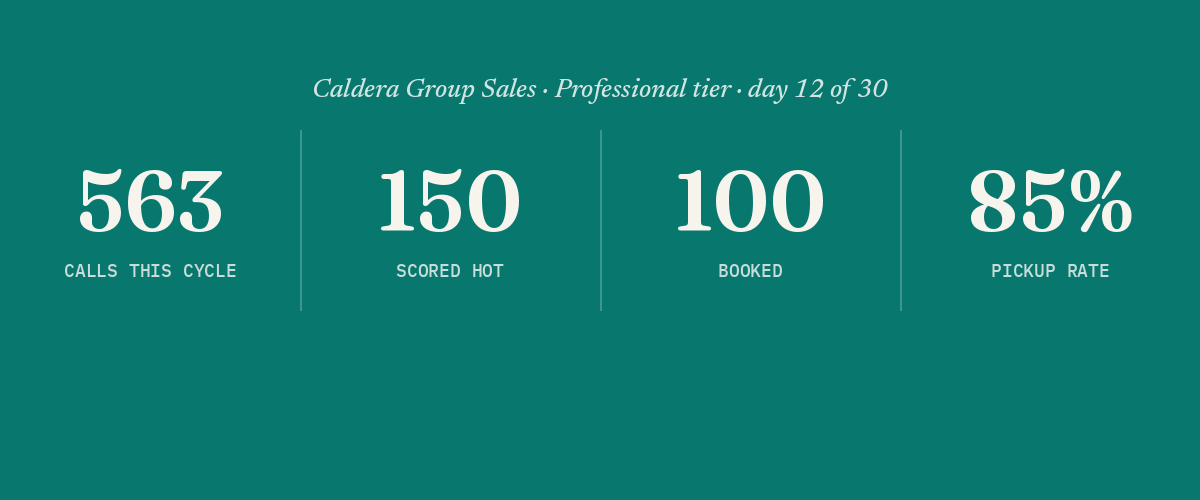
563 calls, 150 scored hot, 100 on the calendar, an 85% pickup rate. These are demo numbers. They are not a customer's results and they are not a projection. They show what the dashboard looks like when it is full.
The lead queue shows six names in three states at once: called, calling, pending. That is the part worth watching. The dashboard shows where every contact stands as it changes, i.e. you never have to ask what happened to a lead. The names and companies are placeholders.
Why it is a demo account
Customer dashboards are private. The call audio, the transcripts and the scores belong to the customer. We do not put a customer's dashboard in a post or a video, and we do not publish a customer's numbers. Access to a customer account is limited and logged, as the security page explains. So every dashboard you see from us is a demo account with made-up data.
Real numbers come from your own list. Every call has a full transcript you can read.
What this does not show
One demo account, one vertical, outbound only. It does not show inbound. It does not show how a queue behaves at 40,000 contacts. It is not evidence of results, and you should not generalize from it.
So was it a real account?
No. It is a demo account with made-up numbers. We called it real in the title as a bit, and this is the straight answer. If you want to hear the product instead of watching a dashboard, call the demo number on the homepage, or from the Assay bubble at the bottom right of your screen, and talk to the agent yourself.
Run your own numbers against this
The calculator estimates recovery from your own call volume. No sales call required to see it.
Open the calculator →